Cross-cutting

Security & compliance

Sensitivity classification and imagery release restrictions are not a settings page bolted on at the end. They sit across the whole chain — order validation, map display, sharing, PDF export, audit trail.

Embargoed zones

Who may see imagery over which country

SatView holds a list of embargoed zones, each country tagged with the regime the restriction derives from. The check governs access to imagery over those zones — and it is evaluated against the person asking and the person receiving.
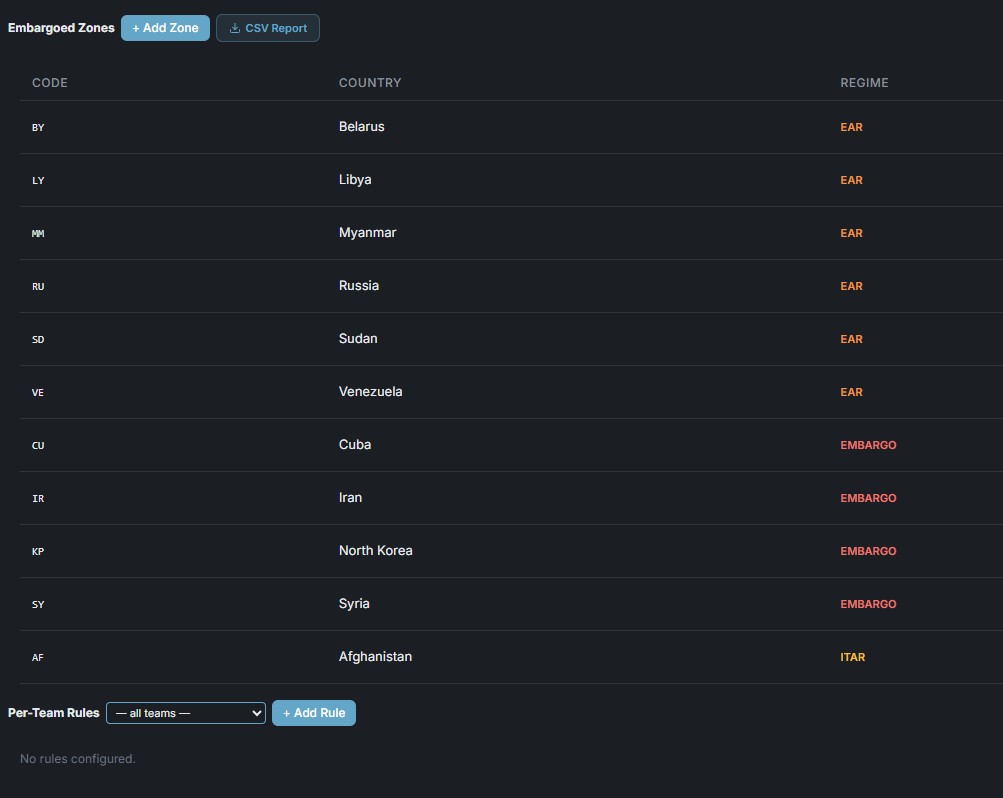
  • Zones, with their source — each country carries the regime it comes from: EAR, EMBARGO or ITAR. The label says where the restriction originates, so an operator can trace any refusal back to a text.
  • User and recipient — the rule is evaluated on both sides. Who is requesting matters; so does who ends up holding the image.
  • Share links included — a report or AOI opened through a public link is subject to the same check, even by someone who has no SatView account.
  • Narrowed per team — additional rules can tighten the baseline for a given team without loosening it for anyone else.
  • Your list to maintain — zones are added and edited in the admin panel, and the whole table exports to CSV for review.
What this is, and what it is not. SatView gives you a mechanism to restrict imagery by geography, by user and by recipient. It does not file anything on your behalf and does not discharge your organization's own obligations — deciding which zones and regimes apply, and keeping the list current, stays with you.
The embargoed zones table in the admin panel: country codes and names such as Belarus, Libya, Myanmar, Russia, Sudan, Venezuela, Cuba, Iran, North Korea, Syria and Afghanistan, each tagged with the regime it derives from — EAR, EMBARGO or ITAR — above a per-team rules section.

Embargoed zones · country, regime, per-team rules

Sensitivity classification

Markings that follow the data

A seven-level ladder drawn from NATO, US and EU practice, with optional caveats and explicit releasability — applied to a workspace and carried through everything produced inside it.
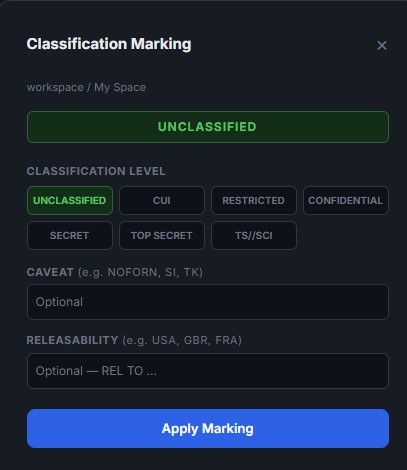
  • Seven levels — UNCLASSIFIED, CUI, RESTRICTED, CONFIDENTIAL, SECRET, TOP SECRET and TS//SCI: a ladder that borrows from NATO, US and EU conventions so it maps onto the scheme your organization already uses.
  • Caveats — free-form compartment and handling markings such as NOFORN, SI or TK.
  • Releasability — an explicit REL TO list, so a marking says who may receive the material and not only how sensitive it is.
  • Applied per workspace — the marking belongs to the workspace, which is also the isolation boundary, so classification and access stay consistent.
  • Persistent banner — the active level is displayed the way an analyst expects it to be, not buried in a settings page.
  • Carried into exports — generated PDFs open with the classification banner on the cover.
The Classification Marking dialog: a green UNCLASSIFIED banner above seven selectable levels from UNCLASSIFIED through TS//SCI, with optional caveat and releasability fields and an Apply Marking button.

Classification marking · levels, caveat, releasability

Platform security

The unglamorous half

Audit log

Every sensitive action is recorded — who, what, when — and queryable from the admin panel.

Encrypted credentials

Provider API keys stored AES-256 encrypted per team. Secrets loaded from environment files; no keys in code, ever.

Rate limiting

Per-user and per-team limits on API and platform usage, tracked in the database.

Roles & sessions

Demo, standard and admin roles. bcrypt passwords, session heartbeat, single-session exclusion, subscription expiry with grace period.

Workspace isolation

Personal and team workspaces with strict data separation — AOIs, orders, detections and reports do not leak across them.

Your perimeter

Self-hosted deployment means imagery, detections and audit logs never leave your infrastructure. There is no SatDream cloud in the path.

A note on honesty. SatView gives you the controls — sensitivity classification, embargoed-zone restrictions, audit trail and workspace isolation. It does not, on its own, make a deployment accredited. Accreditation depends on how and where you run it, and on how you configure it. We are happy to work through that with your security team.

Talk to us about your deployment

Air-gapped, on-premise, or in your own cloud tenancy — tell us the constraints and we will tell you what is possible.

See the architecture