01 · Define
Draw a polygon, rectangle or point on the map — or import GeoJSON, KML/KMZ or XLSX. Buffers, tags, priority, request type and reverse-geocoding are attached automatically.
SatView · Satellite operations platform
SatView plans and orders acquisitions across 29 operators, processes the delivered imagery with OTB, ESA SNAP and native pipelines, and keeps watching on its own. AI analysis — detection, change, segmentation — runs on your own hardware, correlated with real AIS and orbital data. Deployed on your infrastructure, not ours.
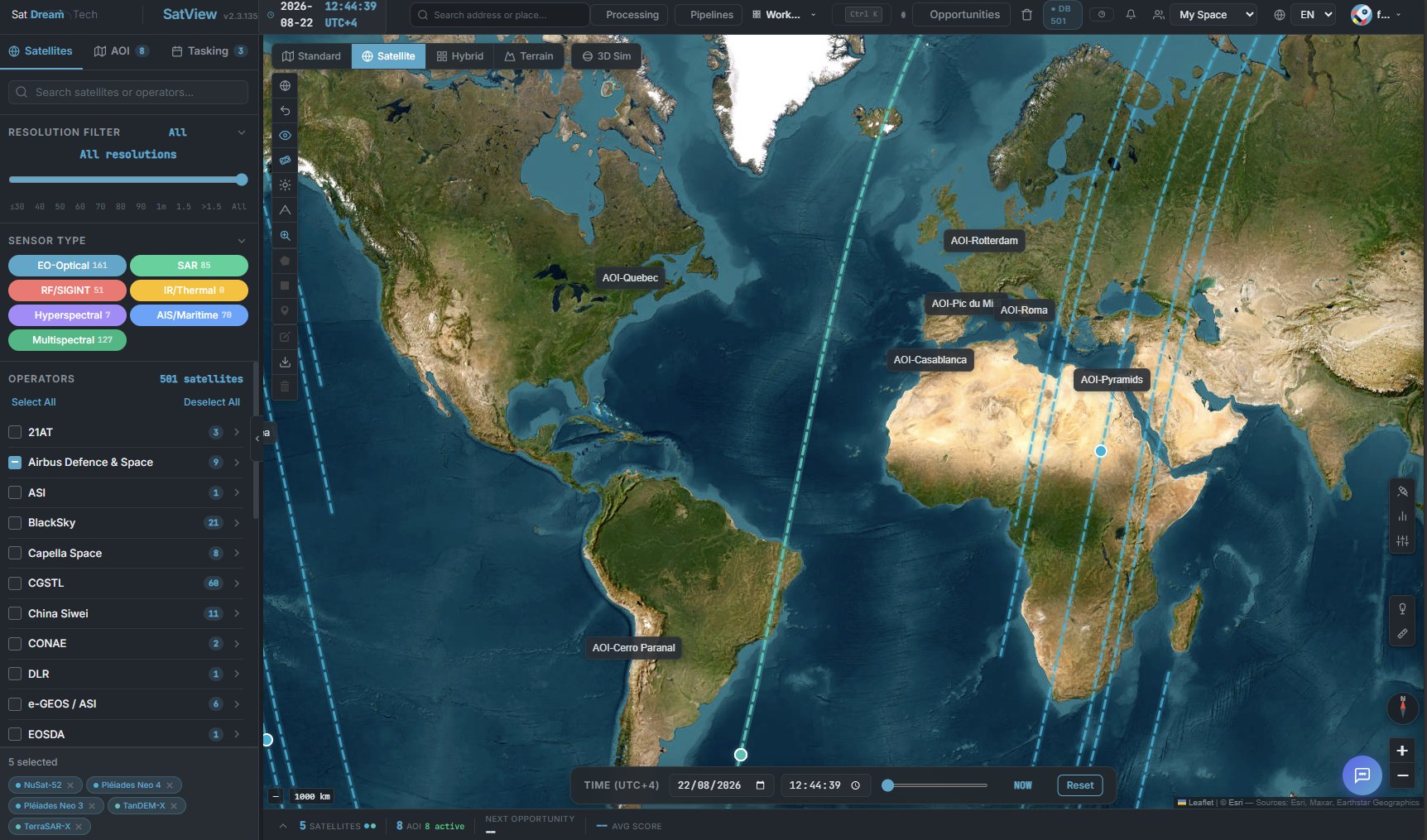
SatView · operations view — 501 satellites, live orbit propagation, areas of interest
The chain
Most platforms stop at the order. SatView carries the imagery through processing and AI analysis, cross-references and fuses it with independent data, then closes the loop — a detected change re-triggers acquisition without anyone asking.
Draw a polygon, rectangle or point on the map — or import GeoJSON, KML/KMZ or XLSX. Buffers, tags, priority, request type and reverse-geocoding are attached automatically.
SGP4 propagation on up-to-date TLEs computes every compatible pass over 7 days, scored on elevation, cloud cover, sun angle and off-nadir.
Order wizard with live cost estimate, or the visual Mission Planner. Weather and embargoed-zone restrictions are checked before confirmation, then the order goes to archive search or direct operator tasking.
Build a processing DAG visually. 30+ native Python operations plus Orfeo Toolbox and ESA SNAP: calibration, atmospheric correction, pansharpening, indices, segmentation, COG conversion.
Object detection, Change Vector Analysis and semantic segmentation — each producing a raster plus a companion GeoJSON in WGS84, so results are geometry you can query and export, not a picture.
Monitoring rules re-acquire on a cadence, retry on excess cloud or poor quality, cross-check NASA FIRMS for active fire, and fire on AI-detected change — evaluated by a 15-minute cron.
Detections cross-referenced with real AIS positions and orbital history, plus a fused SO2/CH4 + wind atmospheric layer — signals kept separate, never collapsed into one invented number.
Explosive Safety — IATG 02.20, DDESB TP-14 QRA, DESR 6055.09 —, Launch Site Explorer — azimuth feasibility plus a shipping-lane/air-corridor/port safety screen — and Natural Hazards & Climate — earthquake, tsunami, volcano and site climatology — all live today, modeled on the same real site imagery, not bolted onto detection.
Processing & AI
Ordering an image is the easy half. SatView takes the delivered scene through a full processing chain — then reads it, too.
Pipeline operations
AI inference
Autonomous monitoring
A monitoring rule turns a one-off acquisition into a standing watch. The loop runs whether anyone is looking at the screen or not.
Re-acquire the AOI on a fixed rhythm — daily, weekly, or whatever the mission needs.
Delivered scene above your cloud threshold? The rule orders a replacement automatically.
Below the quality floor you set, the acquisition is retried rather than silently accepted.
Every new image is compared to a stored baseline. A change score above threshold raises the alert.
Security & sovereignty
Sensitivity classification and imagery release restrictions are not a settings page bolted on afterwards — they sit across the whole chain, from order validation to sharing and PDF export.
Imagery over embargoed countries is restricted by user and by recipient — share links included. Each zone carries the regime it derives from, so any refusal traces back to a text.
Seven levels from UNCLASSIFIED through TS//SCI, drawn from NATO, US and EU practice, with caveats and an explicit releasability list. Persistent banner, and a classification header on every exported PDF.
Every sensitive action is logged. Per-user and per-team rate limits, AES-256 encrypted provider credentials, secrets in environment files — never in code.
Coverage
Track and plan against all 501 satellites. Highlighted operators are connected end-to-end — unified STAC search over their archives and direct ordering from SatView. UP42 adds a tenth connector as a multi-sensor aggregator on top of the operators below.
Optical 161 · multispectral 127 · SAR 85 · AIS / maritime 70 · RF / SIGINT 51 · hyperspectral 7
Video slot
Introduction film — the full chain in motion: AOI, pass prediction, tasking, processing, AI analysis, monitoring rule.
SatView · introduction film
Tell us about your mission and we will walk you through SatView on your data, and through what a deployment on your own infrastructure would look like.
Tell us about your mission — we will get back to you.